Losing your car key fob or watching it slowly die feels like a minor emergency. Your mind immediately jumps to the worst-case scenario: sitting in a cold dealership waiting room for three hours, only to be handed a bill that looks like a mortgage payment just for a tiny piece of plastic.
The good news is that you do not have to make that trip. For a massive number of vehicles on the road today, you can buy a replacement online and sync it up right from the driver seat. Grab your new clicker, hop into the cabin, and let us walk through exactly how to get this done yourself.
Unlocking the Mystery of the Key Fob
Before jumping into the driver seat, it helps to understand what is actually happening inside that little plastic shell. A car key fob is not just a bunch of buttons. It is a tiny, battery-powered radio transmitter. Every time you press lock, unlock, or panic, the fob sends out a specific sequence of radio waves.
Your car has a matching receiver hidden deep under the dashboard. When the receiver hears the correct sequence, it triggers the door locks. The trick is that the car and the fob must speak the exact same language.
When you buy a brand-new clicker from the internet, it arrives completely blank. It is shouting words, but your vehicle does not recognize the accent yet. Programming is simply the process of teaching your vehicle to trust this new little gadget.
Transponders vs Remote Clickers
There is a huge difference between a clicker that opens your doors and a key that starts your engine. You need to know which one you are dealing with before you start.
- The Keyless Entry Remote: This is the standard plastic brick with buttons for your doors and trunk. Programming this usually controls the locks, the alarm, and sometimes a remote start feature.
- The Transponder Key: This is an actual metal key that has a tiny computer chip hidden inside the plastic head. Even if the metal is cut perfectly, the engine will instantly shut off if the car chip does not recognize the key chip.
- The Smart Key or Proximity Fob: This is for push-to-start vehicles. You keep it in your pocket, walk up to the vehicle, and press a button on the dash. These are the most advanced and sometimes require a bit more patience to pair up.
What You Need Before You Start
You cannot just grab any random clicker off the shelf and expect it to work with your specific ride. Preparation prevents a ton of frustration down the road.
Find Your Exact Vehicle Numbers
You need to know your exact year, make, model, and trim level. A clicker for a two-door coupe might use an entirely different internal chip than a four-door sedan made by the exact same company in the exact same year.
You also want to look at the back of your remaining functional clicker if you still have one. Look for a tiny string of text called an FCC Identification Number. This number proves that the internal radio frequency matches the receiver inside your dashboard.
Clear the Calendar and the Workspace
Make sure your vehicle battery is fully charged. You will be turning the ignition on and off repeatedly, which drains a weak battery fast. Park in a quiet area like your driveway or garage where you will not be disturbed, and close all the doors and windows completely.
Method One The Classic Key In Ignition Dance
This is the most common way to program older vehicles, especially those built throughout the late nineties and up to the mid-twenties. It looks a bit like a magic trick because it requires precise timing, but it works beautifully once you get the rhythm down.
Step By Step Walkthrough
- Hop In and Lock Up: Sit comfortably in the driver seat. Close every single door completely. Use the power lock switch on your driver door panel to lock all the doors manually.
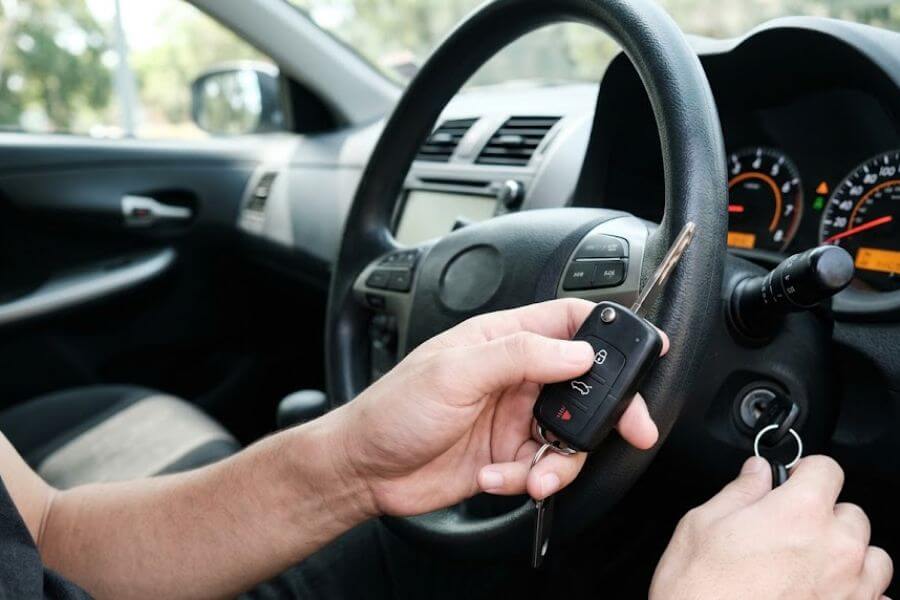
- The Ignition Cycle: Insert your working key into the ignition cylinder. Turn it to the “On” position without actually cranking the engine over. Your dashboard lights should all illuminate, but the engine should remain completely silent.
- The Button Press: Within a few seconds of turning the key to the “On” position, press and hold the “Lock” button on your new remote for exactly one second.
- Turn It Off: Switch the key back to the “Off” position immediately.
- Repeat the Rhythm: You need to repeat this exact cycle three or four times in a row. Turn it on, press lock, turn it off. Turn it on, press lock, turn it off.
- Listen for the Click: On the final cycle, your vehicle should make a distinct clicking noise. The automatic door locks will cycle open and closed on their own. This is your car way of saying it has officially entered programming mode.
- Pair the Remotes: As soon as you hear those locks click, press the “Lock” button on your new remote one more time to save it. If you have older remotes that you still want to use, press the “Lock” button on those right now too. Entering this mode often erases all previous memories, so you must introduce every single remote to the car during the same session.
- Exit the System: Turn the ignition key to the “Off” position completely to finalize the setup. Pull the key out, open your driver door to reset the computer, close it, and test your new buttons.
| Car Maker Examples | Success Rate | Average Time Required |
| Older Ford and Lincoln | Very High | Three minutes |
| Older Honda and Acura | High | Five minutes |
| General Motors Trucks | Medium | Five minutes |
Method Two The Power Door Lock Switch Sequence
Certain manufacturers prefer that you use the physical buttons inside the cabin rather than playing with the ignition switch. This method is incredibly popular with Japanese imports from the early two-thousands.
Step By Step Walkthrough
- Open Wide: Open the driver side door completely and leave it wide open. Ensure all other doors are closed tightly.
- Lock and Unlock: Use the master power lock switch on the driver door panel to cycle the locks. Press lock, then unlock.
- Insert and Remove: Put your master key into the ignition cylinder and pull it straight back out without turning it. Do this twice within five seconds.
- Door Slam Rhythm: Close and open the driver door two times in a row. Leave it open on the second time.
- Key Trick Part Two: Insert the key into the ignition and pull it back out one more time.
- More Door Slams: Close and open the driver door two more times. This time, shut the door completely and leave it closed.
- The Final Turn: Put the key into the ignition switch. Turn it to the “On” position, then turn it straight back to “Off” instantly. Pull the key out of the lock cylinder.
- The Confirmation: The power door locks should click up and down automatically within two seconds. If they do, press and hold both the “Lock” and “Unlock” buttons on your replacement fob at the exact same time for two seconds. Release them, then press the “Lock” button for one second. The doors will click again to let you know the process worked.
Method Three The Electronic Driver Information Center
If you drive a slightly more modern domestic truck or SUV, you might have a built-in computer screen right in your instrument cluster that does the heavy lifting for you. This makes the job much simpler because you can read the instructions on your dashboard.
Step By Step Walkthrough
- Access the Menu: Turn your key to the running position. Use the steering wheel controls or the small dashboard buttons to scroll through your personal settings menu.
- Find the Relearn Mode: Look for a screen that reads something along the lines of “Relearn Remote Key” or “Program Key Fob.”
- Hold to Activate: Press and hold the selection checkmark button or the trip odometer reset button until the screen changes and says “Remote Key Learning Active.”
- Sync the Hardware: Press and hold the “Lock” and “Unlock” buttons on your new clicker simultaneously. You will need to hold them for anywhere from ten to thirty seconds. Keep holding until you hear a chime or see the dashboard screen flash a confirmation message.
- Turn Off the Car: Turn the key to the off position to close out the digital learning menu.
Method Four The Smart Key Pocket Placement
Push-to-start vehicles do not use a standard metal ignition switch, which means the previous methods will not work. These vehicles rely on a proximity sensor. If the fob battery dies completely, there is always a secret physical backup pocket inside the cabin designed to read a blank or dead key.
Step By Step Walkthrough
- Locate the Secret Slot: Check your owner manual to find the vehicle hidden transmitter pocket. It might be hidden at the bottom of the center console storage bin, inside the glovebox, or underneath the plastic cup holder inserts. Sometimes it is a physical slot on the side of the steering column where a normal key would usually go.
- Position the Device: Place your brand-new, unprogrammed smart key directly into that slot or pocket.
- The Button Dance: Without pressing the brake pedal, press the engine start button once to turn on the accessory power. Wait ten seconds, then press it again to turn it off.
- Hold Your Ground: Press and hold the “Unlock” button on your driver side door panel while simultaneously pressing the “Lock” button on your new remote three times quickly.
- Test the Start: Remove the smart fob from its secret pocket, press down on your brake pedal, and try to start the engine normally. If the engine roars to life, your vehicle has accepted its new partner.
Troubleshooting Common Programming Mistakes
If you followed every single step perfectly and nothing happened, do not worry. This is incredibly common, and it usually boils down to a few very specific, minor issues that are simple to fix on your second attempt.
Tiny Timing Blunders
The most common reason for failure is timing. If a guide says to turn the key five times in ten seconds, it means exactly that. If you go too slow, the computer thinks you are just turning the car on to go to the grocery store. If you go too fast, the system might not register the electrical connection. Use a wristwatch or count out loud to keep yourself steady.
Dead Internal Batteries
You would be amazed by how many brand-new clickers ship with completely dead coin-cell batteries inside them. They sit in warehouse bins for months or even years before they make it to your front door. If your programming routine fails, pop the plastic case open using a flat-head screwdriver and swap out the battery for a fresh one from the store.
The Door and Window Trap
Your car main computer tracks the open or closed status of every portal on the vehicle. If your hood latch is slightly loose, or if a rear passenger door is cracked open by a quarter of an inch, the computer will refuse to enter programming mode as a built-in safety feature. Double-check that absolutely everything is shut tight before you start clicking away.
Frequently Asked Questions
Can I program a brand-new key fob if I do not have any original working keys left?
For the vast majority of vehicles, you must have at least one fully operational, previously paired key to initiate the manual programming sequence yourself. The car computer needs proof that an authorized user is sitting in the driver seat before it opens up its digital security gates to accept a new device. If you have lost absolutely every single remote to your vehicle, you will typically need to call a mobile automotive locksmith who can plug a specialized diagnostic computer directly into your vehicle OBD-II data port to flash the system memory from scratch.
Why did my old key fob stop working completely after I successfully programmed the new replacement one?
Many automotive computers use a rolling code security setup that wipes out all existing remote memories whenever the vehicle enters its learning mode. The vehicle treats the programming session as a completely fresh start to ensure that someone who previously stole a key cannot access your vehicle. To fix this issue, you simply need to redo the programming sequence, but make sure you press the buttons on both your old remote and your new remote during the exact same session before you turn the ignition off.
How do I know if my specific car requires a special computer tool or if it can be done manually?
The easiest way to determine this is by researching your specific vehicle make and model year online or reading through your factory owner manual under the keyless entry section. Generally speaking, vehicles manufactured before the year twenty-ten have a very high chance of supporting manual programming sequences. Vehicles made within the last few years often rely on heavy encryption that completely blocks manual overrides, meaning they require an external programming tool.
Is it safe to buy cheap replacement key fobs from discount online stores?
It is generally safe, but you must look closely at the product details before spending your money. Many cheap options look exactly like your factory clicker on the outside, but they might house cheap internal circuit boards that operate on the wrong radio frequency or fail to hold a stable connection. Always read customer reviews specifically from people who own the exact same year and model of your vehicle to ensure the internal components are truly compatible with your car receiver.
What should I do if my new key fob locks the doors but the mechanical key blade will not turn the ignition cylinder?
You are dealing with two completely separate automotive systems here. The radio transmitter buttons are programmed electronically through the methods discussed above, but the mechanical metal blade must still be physically cut to match the unique pin layout inside your specific ignition cylinder. You can easily take your blank replacement blade along with your original working key to a local hardware store, home improvement center, or locksmith to have it duplicated using a standard key-cutting machine.